
Alda Grimes
New member
- Joined
- Jun 27, 2026
- Messages
- 1
- Points
- 0
SMTasker - Android-Based Social Media Automation
Automate Instagram, TikTok, and Threads workflows from connected Android phones or emulators: Follow, Unfollow, Like, Comment, DM/Contact, Story/Reels/Video viewing, Save, Like Comments, and Publish.

Start 5-Day Free Trial | Ask a Question
WHAT IS SMTasker?
SMTasker is social media automation software for operators, agencies, and account managers who want to run repeatable Instagram, TikTok, and Threads activity from connected Android phones or Android emulators.
Instagram, TikTok, and Threads are the current focus, but more platforms are planned. Active SMTasker users will get access to newly added supported platforms as they are released inside the software.
You control the accounts, devices, sources, limits, active hours, filters, content, and messages. SMTasker handles the repetitive execution and gives you logs, results, statistics, summaries, and device/account visibility from one dashboard.
This is not a follower-selling service, bot traffic service, account shop, or done-for-you agency. It is software access for running your own automation stack.
EXACT TOOLS YOU CAN AUTOMATE
Engagement tools

SOURCE TARGETING AND FILTERS
The value of automation is not just "run actions". The value is choosing better targets, pacing the activity, and reviewing what actually happened.
Source types can include:
GROWTH STACKS YOU CAN BUILD
Follower growth stack
Follow targeted users from competitor/audience sources, add light visibility with StoryViewer/ReelViewer or Like, then use Unfollow with a holding period to clean up non-followers while protecting people who followed back.
Lead generation stack
Use Follow to warm the touchpoint, then use Contact/DM workflows on selected sources. Add skip logic so the same account is not hit repeatedly.
Engagement stack
Use Like, Comment, Save Posts, Like Comments, StoryViewer, and ReelViewer around the same niche source pools so the account is active around the market you actually care about.
TikTok warm-up and content signal stack
Start with VideoViewer on niche sources, then layer Like, Follow, Comment, Save Posts, and Publish after the account has a content consumption pattern.
Content-led stack
Use Publish to keep the account active, then use Like/Follow/Comment/Contact tools to push discovery and conversations toward an account that has recent content.
DASHBOARD FEATURES FOR MANAGING MULTIPLE ACCOUNTS
WHY ANDROID DEVICES?
Many automation tools hide the execution layer. SMTasker is built around a more visible setup: a Windows computer, connected Android phones or Android emulators, and a dashboard that controls the workflows. Mac support is also being worked on and is planned for a future release.
That means you can separate accounts by device, test one account before scaling, troubleshoot a device session, and build a setup that is easier to understand than a black-box cloud panel.
WHO THIS IS FOR
WHO THIS IS NOT FOR
PRICING
All plans include:
FREE TRIAL
You can start with a 5-day free trial before committing to a paid subscription.
Start here:
https://smtasker.com/get-started/
REFUND POLICY
SMTasker offers a 5-day free trial before any charge is made.
For new subscribers, a refund may be requested within 7 days of the initial purchase date when eligible under the SMTasker refund policy.
To request a refund, contact us through the contact form and include the account email connected to the purchase:
https://smtasker.com/contact-us/
Approved refunds are typically processed within 5-10 business days, depending on the payment provider.
Renewals, unused subscription time after cancellation, downgraded plans, and accounts suspended for violation of the Terms of Service are generally not refundable.
If a technical issue prevents you from accessing or using SMTasker, contact support during the eligibility window so we can help review the account and setup.
DELIVERY AND SETUP
Access is created through the SMTasker website flow after you choose a plan and enter your account email.
To begin using SMTasker, you will need:
PLATFORM AND RISK DISCLOSURE
This is automation software. Social platform rules and tolerance can change. You are responsible for how you use your own accounts, devices, sources, settings, limits, content, and messages.
SMTasker provides workflow controls, device-based execution, logs, limits, filters, and setup support. It does not promise follower growth, account status, reach, revenue, platform approval, or any specific social media outcome.
Use realistic settings, relevant sources, active hours, logs, and manual review. The software gives you control; it does not replace judgment.
CONTACT DETAILS
BHW DM:
SMTasker - contact me by direct message on BlackHatWorld if you have any questions.
Email:
contact@smtasker.com
REVIEW COPIES
No public free review copies are offered in the thread.
Marketplace staff review access will be provided during BHW approval if required by the marketplace rules.
FAQ
Is SMTasker a managed service?
No. SMTasker is software access. You manage your own devices, accounts, workflows, settings, sources, content, and platform usage.
Do I need an Android phone?
An Android phone is the recommended starting point for most users. Android emulators can also be used when they fit your setup.
Can I run multiple accounts?
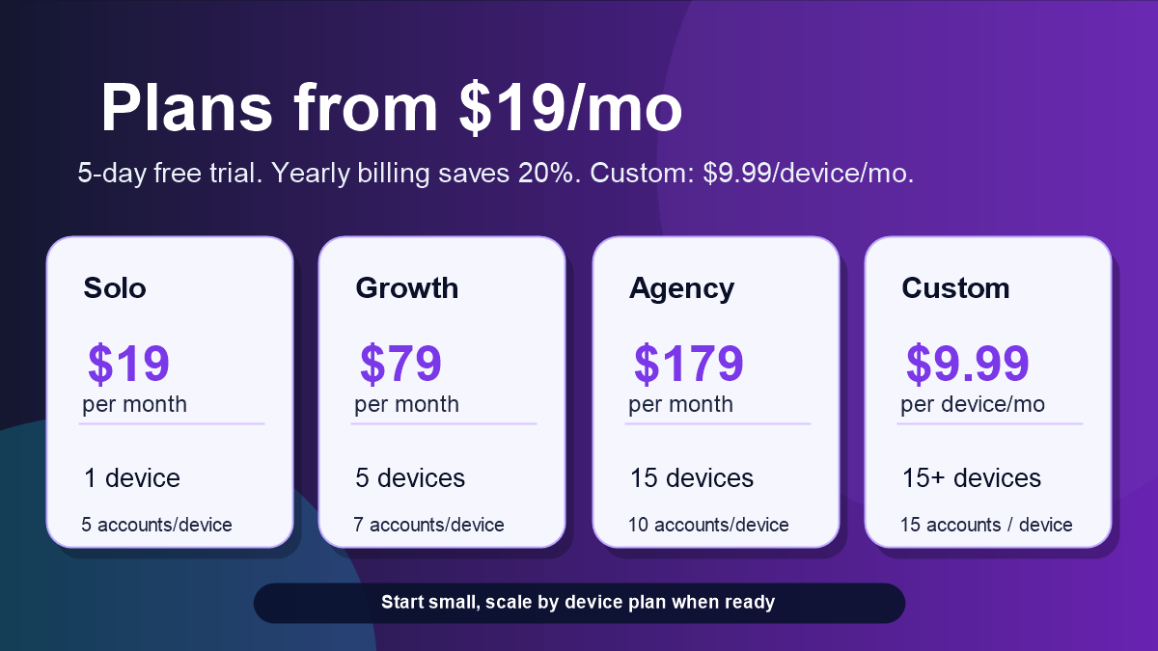
Yes. The number of devices and accounts depends on the plan. Solo includes 1 connected device, Growth includes 5 devices, Agency includes 15 devices, and the Custom Plan starts at 15+ devices for $9.99/month per device.
Can I automate DMs?
SMTasker includes Contact/DM-style workflows for outreach where supported. You should use relevant sources, skip logic, and messages that fit your audience.
Can I automate follow/unfollow?
Yes. SMTasker includes Follow and Unfollow workflows with sources, limits, holding periods, and cleanup logic.
Can I use it for TikTok warm-up?
Yes. TikTok VideoViewer can run niche video viewing workflows before you layer heavier actions such as Follow, Comment, Contact, or Publish.
Does SMTasker promise growth or account results?
No. SMTasker does not promise followers, reach, sales, account status, or platform outcomes.
Do you sell followers, likes, views, or accounts?
No. SMTasker sells software access for managing automation workflows from your own devices and accounts.
Build your first automation stack
Connect one Android device, choose one platform, select one workflow, and test SMTasker with a 5-day free trial.
Start Free Trial | Ask a Question

Automate Instagram, TikTok, and Threads workflows from connected Android phones or emulators: Follow, Unfollow, Like, Comment, DM/Contact, Story/Reels/Video viewing, Save, Like Comments, and Publish.
Start 5-Day Free Trial | Ask a Question
WHAT IS SMTasker?
SMTasker is social media automation software for operators, agencies, and account managers who want to run repeatable Instagram, TikTok, and Threads activity from connected Android phones or Android emulators.
Instagram, TikTok, and Threads are the current focus, but more platforms are planned. Active SMTasker users will get access to newly added supported platforms as they are released inside the software.
You control the accounts, devices, sources, limits, active hours, filters, content, and messages. SMTasker handles the repetitive execution and gives you logs, results, statistics, summaries, and device/account visibility from one dashboard.
This is not a follower-selling service, bot traffic service, account shop, or done-for-you agency. It is software access for running your own automation stack.
EXACT TOOLS YOU CAN AUTOMATE
Engagement tools
- Like - like posts from source pools such as hashtags, explore/discovery-style sources, account search, and selected accounts where supported.
- Comment - run controlled comment workflows with limits, sources, and AI-assisted or prepared comment logic depending on setup.
- Like Comments - engage with comment sections where this workflow fits the platform/account.
- Save Posts - save relevant posts as part of content-interest and engagement routines.
- Follow - follow targeted users from sources such as competitor audiences, users who interacted with target accounts, account search, hashtag/search-style sources, and saved lists where supported.
- Unfollow - clean up following lists, unfollow users previously followed by SMTasker, use holding periods, and protect followers with "do not unfollow followers" style logic.
- StoryViewer - view Instagram stories from relevant sources.
- ReelViewer - watch Instagram Reels from niche-relevant sources.
- VideoViewer - watch TikTok videos from niche hashtag, explore/feed, and account-search sources to build a more relevant content pattern before heavier actions.
- Contact / DM workflows - send outreach/contact messages from selected sources, with skip logic for accounts already contacted or already interacted with where configured.
- Publish - publish from prepared media/content folders, use platform-specific posting routines, and support content-led growth instead of only engagement activity.
- Instagram - Like, Follow, Unfollow, Comment, Contact, Save Posts, StoryViewer, ReelViewer, Like Comments, Publish.
- TikTok - VideoViewer, Like, Follow, Unfollow, Comment, Contact, Save Posts, Publish, and related account workflows.
- Threads - posting, engagement, account activity, and Threads-specific workflows where supported by the current toolset.
- More platforms planned - new supported platforms will be added over time, and active SMTasker users will get access to them as they are released.
SOURCE TARGETING AND FILTERS
The value of automation is not just "run actions". The value is choosing better targets, pacing the activity, and reviewing what actually happened.
Source types can include:
- Hashtag search and niche hashtag lists.
- Competitor accounts and target account followers.
- Users that interacted with target accounts.
- Specific users / saved account lists.
- Account search by keywords or creator/account type.
- Explore, feed, Reels, Video, or discovery-style sources where supported.
- Media/content folders for Publish workflows.
- Skip private accounts.
- Skip accounts already followed.
- Skip accounts already interacted with.
- Minimum and maximum follower counts.
- Minimum and maximum following counts.
- Minimum and maximum post counts.
- Ignore lists for accounts you never want touched.
- Auto-suspend style handling when an action block/restriction is detected.
- Min/max action ranges.
- Daily caps.
- Active days.
- Active hours.
- Holding periods for Follow/Unfollow cleanup.
- Per-tool settings instead of one global setting for every action.
GROWTH STACKS YOU CAN BUILD
Follower growth stack
Follow targeted users from competitor/audience sources, add light visibility with StoryViewer/ReelViewer or Like, then use Unfollow with a holding period to clean up non-followers while protecting people who followed back.
Lead generation stack
Use Follow to warm the touchpoint, then use Contact/DM workflows on selected sources. Add skip logic so the same account is not hit repeatedly.
Engagement stack
Use Like, Comment, Save Posts, Like Comments, StoryViewer, and ReelViewer around the same niche source pools so the account is active around the market you actually care about.
TikTok warm-up and content signal stack
Start with VideoViewer on niche sources, then layer Like, Follow, Comment, Save Posts, and Publish after the account has a content consumption pattern.
Content-led stack
Use Publish to keep the account active, then use Like/Follow/Comment/Contact tools to push discovery and conversations toward an account that has recent content.
DASHBOARD FEATURES FOR MANAGING MULTIPLE ACCOUNTS
- Connected device dashboard - see which Android phones/emulators are available.
- Account dashboard - manage accounts without jumping from device to device.
- Automations dashboard - see active tools, actions today, and current status.
- Results tab - review accounts/posts acted on by each tool.
- Statistics tab - see activity trends over time.
- Summary log - review detailed run events, errors, blocks, and source usage.
- Tags - group accounts by client, niche, platform, or stack type.
- Copy Settings - copy one tuned tool setup to the same tool on other accounts.
- Clone With - copy a full automation stack from one account to other accounts.
WHY ANDROID DEVICES?
Many automation tools hide the execution layer. SMTasker is built around a more visible setup: a Windows computer, connected Android phones or Android emulators, and a dashboard that controls the workflows. Mac support is also being worked on and is planned for a future release.
That means you can separate accounts by device, test one account before scaling, troubleshoot a device session, and build a setup that is easier to understand than a black-box cloud panel.
WHO THIS IS FOR
- BHW users who want social automation software, not fake follower packages.
- Agencies managing multiple Instagram, TikTok, or Threads accounts.
- Operators building follow/unfollow, DM/contact, viewing, and publishing stacks.
- People who prefer Android phone or emulator workflows over browser extensions.
- Users who want sources, filters, limits, logs, and repeatable account setups.
WHO THIS IS NOT FOR
- Anyone expecting fixed follower, reach, sales, or revenue results.
- Anyone trying to buy followers, likes, views, or accounts.
- Anyone who wants a fully managed agency service.
- Anyone who wants to run uncontrolled volume without sources, limits, or review.
PRICING
All plans include:
- Instagram, TikTok, and Threads support.
- Access to newly added supported platforms in the future, as they are released for active SMTasker users.
- Engagement, viewing, outreach, and publishing automations.
- Connected device workflows.
- Limits, active hours, logs, and setup support.
- 5-day free trial.
- 1 connected device.
- Up to 5 accounts per device.
- Good for one operator testing the workflow on a focused setup.
- 5 connected devices.
- Up to 7 accounts per device.
- Good for growing agencies and multi-account workflows.
- 15 connected devices.
- Up to 10 accounts per device.
- Good for teams that need more device capacity and repeatable stacks.
- For larger setups starting at 15+ connected devices.
- Includes up to 15 accounts per device.
- Fixed custom price: $9.99/month per device.
- Example: 20 devices would be $199.80/month.
FREE TRIAL
You can start with a 5-day free trial before committing to a paid subscription.
Start here:
https://smtasker.com/get-started/
REFUND POLICY
SMTasker offers a 5-day free trial before any charge is made.
For new subscribers, a refund may be requested within 7 days of the initial purchase date when eligible under the SMTasker refund policy.
To request a refund, contact us through the contact form and include the account email connected to the purchase:
https://smtasker.com/contact-us/
Approved refunds are typically processed within 5-10 business days, depending on the payment provider.
Renewals, unused subscription time after cancellation, downgraded plans, and accounts suspended for violation of the Terms of Service are generally not refundable.
If a technical issue prevents you from accessing or using SMTasker, contact support during the eligibility window so we can help review the account and setup.
DELIVERY AND SETUP
Access is created through the SMTasker website flow after you choose a plan and enter your account email.
To begin using SMTasker, you will need:
- A Windows computer. Mac support is being worked on and is planned soon.
- An Android phone or Android emulator.
- A stable internet connection.
- Access to the social accounts you want to manage.
- The SMTasker local client and dashboard access.
PLATFORM AND RISK DISCLOSURE
This is automation software. Social platform rules and tolerance can change. You are responsible for how you use your own accounts, devices, sources, settings, limits, content, and messages.
SMTasker provides workflow controls, device-based execution, logs, limits, filters, and setup support. It does not promise follower growth, account status, reach, revenue, platform approval, or any specific social media outcome.
Use realistic settings, relevant sources, active hours, logs, and manual review. The software gives you control; it does not replace judgment.
CONTACT DETAILS
BHW DM:
SMTasker - contact me by direct message on BlackHatWorld if you have any questions.
Email:
contact@smtasker.com
REVIEW COPIES
No public free review copies are offered in the thread.
Marketplace staff review access will be provided during BHW approval if required by the marketplace rules.
FAQ
Is SMTasker a managed service?
No. SMTasker is software access. You manage your own devices, accounts, workflows, settings, sources, content, and platform usage.
Do I need an Android phone?
An Android phone is the recommended starting point for most users. Android emulators can also be used when they fit your setup.
Can I run multiple accounts?
Yes. The number of devices and accounts depends on the plan. Solo includes 1 connected device, Growth includes 5 devices, Agency includes 15 devices, and the Custom Plan starts at 15+ devices for $9.99/month per device.
Can I automate DMs?
SMTasker includes Contact/DM-style workflows for outreach where supported. You should use relevant sources, skip logic, and messages that fit your audience.
Can I automate follow/unfollow?
Yes. SMTasker includes Follow and Unfollow workflows with sources, limits, holding periods, and cleanup logic.
Can I use it for TikTok warm-up?
Yes. TikTok VideoViewer can run niche video viewing workflows before you layer heavier actions such as Follow, Comment, Contact, or Publish.
Does SMTasker promise growth or account results?
No. SMTasker does not promise followers, reach, sales, account status, or platform outcomes.
Do you sell followers, likes, views, or accounts?
No. SMTasker sells software access for managing automation workflows from your own devices and accounts.
Build your first automation stack
Connect one Android device, choose one platform, select one workflow, and test SMTasker with a 5-day free trial.
Start Free Trial | Ask a Question